

Last week we did the thing we usually do for clients — to ourselves. New design, new theme, and a move from a staging subdomain to our main domain, all in one go. Total downtime: a few seconds. Rankings kept, analytics unbroken, every old link still working.
Most websites don’t get relaunched this way. The redesign gets all the attention, the migration gets an afternoon — and three months later someone asks why Google traffic fell off a cliff. So here is the exact checklist we used on our own site, in order, with the two bugs it caught.
Want us to handle it? Website relaunch & SEO migration →
Why relaunches lose rankings
It’s almost never the new design. It’s the URLs. Every page Google has indexed is a small asset with history behind it — links, impressions, a known position. When a relaunch quietly changes /our-work to /work and nobody tells Google, that history doesn’t transfer. It evaporates. Multiply by every page on the site and you’ve thrown away years of slow, compounding work in one deploy.
Step 1: List every URL Google knows about
Not the pages you remember — the pages that exist. We pull from three sources: the old XML sitemap (every URL Google was explicitly given), Search Console (every URL getting impressions, including ones you forgot), and analytics landing pages (where real visitors actually enter). Ours came to 53 URLs. Yours might be 500. The number doesn’t matter; missing one that earns traffic does.
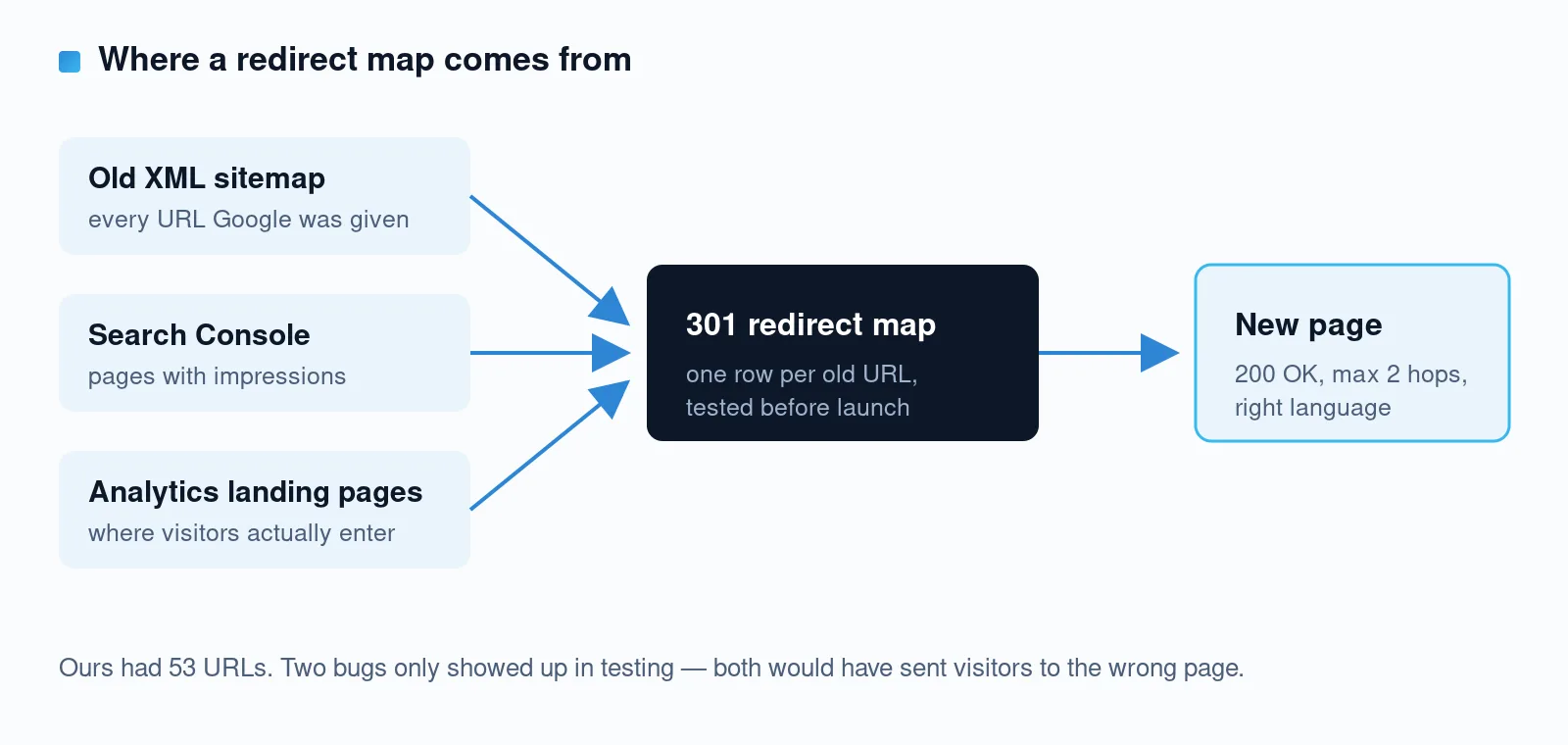
Step 2: Build the 301 map — one row per old URL
Every old URL gets a permanent redirect to its closest equivalent on the new site. Three rules we hold ourselves to:
- Closest equivalent, not the homepage. Redirecting everything to
/tells Google the old pages had no real replacement — and tells visitors nothing at all. - Two hops maximum. Chains of redirects leak speed and crawl budget. Old URL → new URL, done.
- Right language. If your site is multilingual, check that English URLs land on English pages. This sounds obvious. Keep reading.
Step 3: Test the map before launch — all of it
We scripted a check that hits every one of the 53 old URLs and verifies the final destination: status 200, max two hops, correct language. That sweep caught two bugs that read fine on paper.
The first: WordPress has its own “guess where this 404 should go” logic that runs before custom redirects unless you explicitly outrank it — and it was sending an old English blog URL to its Serbian translation. The second: a leftover slug on a translated post did the same thing from another direction. Both would have shipped. Both were invisible until we tested every URL, not a sample.
Step 4: Don’t forget the files
Pages get redirects; images usually get forgotten. Old image URLs live on in Google Images, in social link previews, in other people’s blog posts. We copied years of old uploads to the new site so a decade of image links keeps resolving. Twenty minutes of work for a category of 404s that never happens.
Step 5: Keep measurement continuous
Analytics and Search Console must survive the switch, or you lose the before/after picture exactly when you need it. Our GA4 tag and Search Console verification live in the theme and are domain-agnostic, so they carried over untouched. One honest side note: while preparing this we found our old site had been running a Universal Analytics tag — dead since 2023 — quietly collecting nothing for three years. Worth checking yours.
Step 6: Launch in minutes, verify immediately
The switch itself was two folder moves and a database search-replace — seconds of downtime, instantly reversible. Then we re-ran the full URL sweep against the live domain and checked the things that only break in production: robots meta, sitemap, canonicals.
Good thing, too. Post-launch we caught our SEO plugin pointing the canonical of our Serbian homepage at the English one — which would have quietly dropped the Serbian homepage out of Google. Five-line fix. Zero chance we’d have noticed without looking.
The weeks after: what’s normal
In Search Console, expect old URLs to show up as “Page with redirect” — that’s not an error, that’s the plan working. Positions can wobble for a few weeks while Google re-crawls. What you should not see is 404s on pages that used to earn traffic. If you do, your map missed a row.
The takeaway
A relaunch done right is boring: nobody notices, nothing drops, and the new site starts earning from the equity the old one built. The checklist isn’t complicated — it’s just rarely done completely. The bugs we caught weren’t exotic; they were the default behavior of very popular software, waiting for someone to test every URL instead of most of them.
Planning a redesign and worried about what it might cost you in Google? That’s exactly the kind of thing our free audit flags. Send us your URL →
Want us to handle it? Website relaunch & SEO migration →